Excel-to-Word Updates
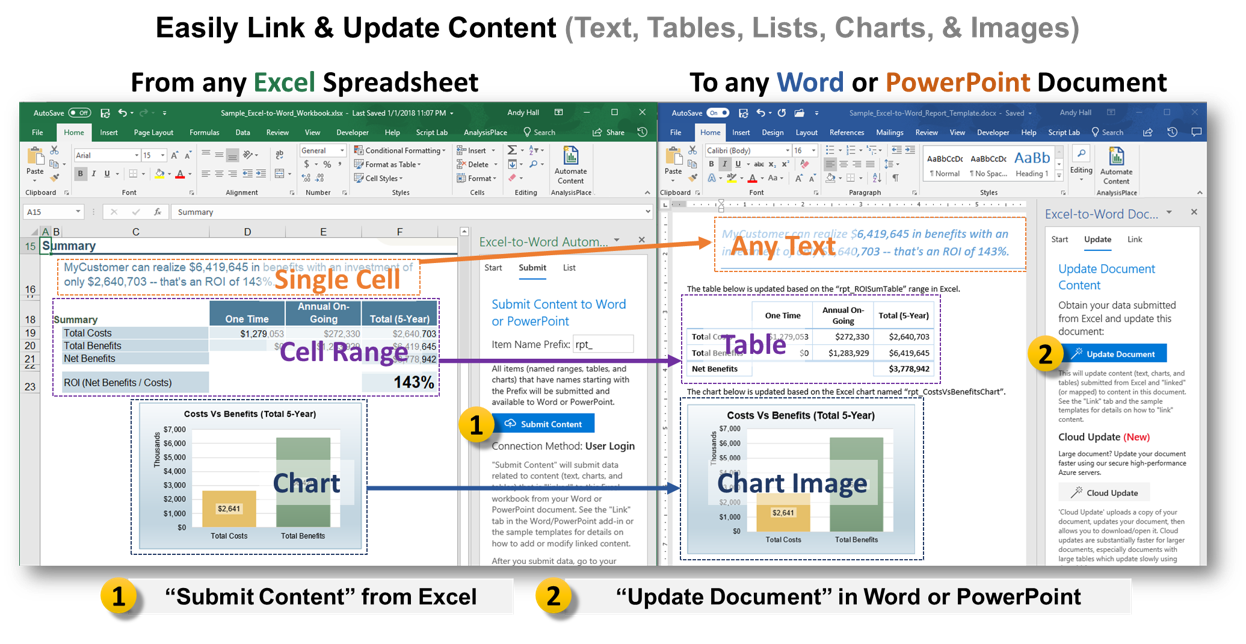
Update content in Word documents based on data from Excel workbooks.
- Reliably update hundreds of text, ranges, and tables in seconds
- Use links that don't break when you change file names or location or when you share with others
“Excel-to-Word Updates” is a feature included in the Excel-to-Word Document Automation Add-In.

“Excel-to-Word Updates” enables you to: 1) submit values from named text, ranges, and tables from an Excel workbook. Then, 2) update data in matching named text, ranges, tables, charts, and more in Word documents.
Excel-to-Word Document Automation
Update Word and PowerPoint documents from content in your Excel workbooks using robust portable links.
Automate your customer proposals, recurring business/financial reports, assessment results, data-intensive contracts, and more!
The add-in is successfully used by many individuals and small to large organizations to improve productivity and document quality.
Quick/secure install via the Microsoft Office Store.
Works with Office for Windows and Office for Mac
Requires Microsoft Office 365 (Subscription Version) or Office 2019 or newer

We highly recommend starting with the "Insert Sample Content" on the "Start" tab of the add-in. It contains a detailed guide on how to link content.
How It Works
Link Excel-to-Word once, then update many times
- On the Link tab of the Excel add-in, name the cells, ranges, tables, charts, or images you want to use.
- Click Create Link. The link immediately becomes available in the Word add-in.
-
In Word on the Link tab, either:
- Link content individually as you build your document, or
- Use Get Excel Content to make all linked Excel items available in the add-in.
- Make changes in Excel and click Update from Excel or Word.
How to Link Content
What's New: Simpler Linking
We've streamlined how your documents connect.
- Use the new Create Link button on the Link Tab of the add-in in Excel.
- Links immediately become available in the add-in in Word and PowerPoint.
- No more submitting changes.
- Update linked content directly from Excel or Word/PowerPoint with just one click
Linking content from Excel to Word is easy. You can link text, tables, charts, images, and more. The add-in uses a simple naming convention to link content. You can link content from Excel to Word in a few simple steps.
View the tutorial to see how:
Other linking instructions can be found:- In Excel: on the List Tab, under “How to Name Content”
- In Word: on the Link Tab under details
Common Use Cases
- Financial Reports: Pull revenue, expenses, and trends directly from Excel spreadsheets.
- Budgets and Forecasts: Generate dynamic documents based on Excel-based financial models.
- Performance Dashboards: Integrate charts and metrics sourced from Excel.
- Project Reports: Use Excel for task tracking or resource allocation tables.
- Invoices: Populate customer details, line items, and totals from Excel sheets.
- Sales Reports: Automate summaries of sales data with charts and statistics.
- Inventory Reports: Pull stock levels and product lists directly from Excel.
- Meeting Agendas: Include attendee lists or schedules from an Excel file.
- Compliance Documentation: Automate logs or audit data stored in Excel.
- Survey Results: Summarize quantitative data into tables and graphs.
- Status Updates: Include progress charts or timelines maintained in Excel.
- Client Proposals: Pull pricing models or configurations directly from Excel sheets.
- Technical Reports: Populate test results or performance benchmarks from Excel.
- Employee Reviews: Extract performance data or goals stored in Excel.
- Risk Assessments: Integrate tables and risk matrices from Excel.
- Service Contracts: Populate pricing tables or deliverable schedules.
- Grant Applications: Pull budget justifications or financial breakdowns.
- Feasibility Studies: Automate analysis results and projections.
- Insurance Claims: Use Excel for benefit calculations or payout tables.
- Legal Reports: Automate document generation for case summaries or damages calculations.
- Event Plans: Import schedules, vendor lists, or budgets.
- Training Manuals: Include test data or resource tracking.
- Annual Reports: Pull financial summaries and performance data from Excel.
- Procurement Documents: Integrate bids or vendor comparison tables.
- Product Specifications: Populate spec sheets with details managed in Excel.
- Research Papers: Automate inclusion of experimental data or statistical analysis.
- Contractor Reports: Use Excel to track hours worked, costs, and milestones.
- Medical Reports: Extract and summarize health data or test results.
- Marketing Campaign Plans: Populate data-driven insights or campaign tracking.
- Performance Analytics: Pull metrics and analysis directly from Excel files.